
How to Process a Refund in Tabeo
You can issue a refund in Tabeo in just a few steps. This guide walks you through both full and partial refunds.
There are two ways to process a refund:
Method 1: Refund by Card
Method 2: Refund by Bank Transfer
Please check with your internal team which method your practice should use. Scroll down to read more about each method.
How refunds work in Tabeo
It helps to understand how refunds work:
- Refunds are based on the treatment cost, not what the patient has repaid
- Tabeo calculates the exact refund amount for you
- You’ll make a payment (by card or bank transfer), and we’ll handle the rest
You don’t need to calculate anything yourself.
Before you start
You’ll need:
- Access to your Tabeo app
- The Transaction ID (you can find this in the “Transactions” section)
Important:
- You don’t need to know how much the patient has repaid on their loan. This is independent of the refund process, and we’ll be unable to share this information with you for GDPR reasons.
Method 1: Refund by Card
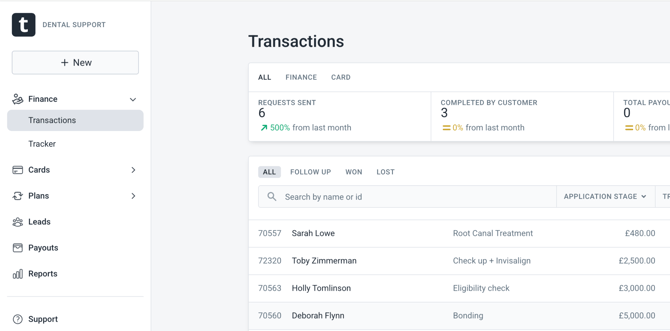
Step 1: Find the transaction
- Log in to your Tabeo app
- Go to Transactions
- Search using the Transaction ID
- Open the transaction
Step 2: Start the refund
- Click View refund options
Step 3: Choose full or partial refund
You’ll be asked:
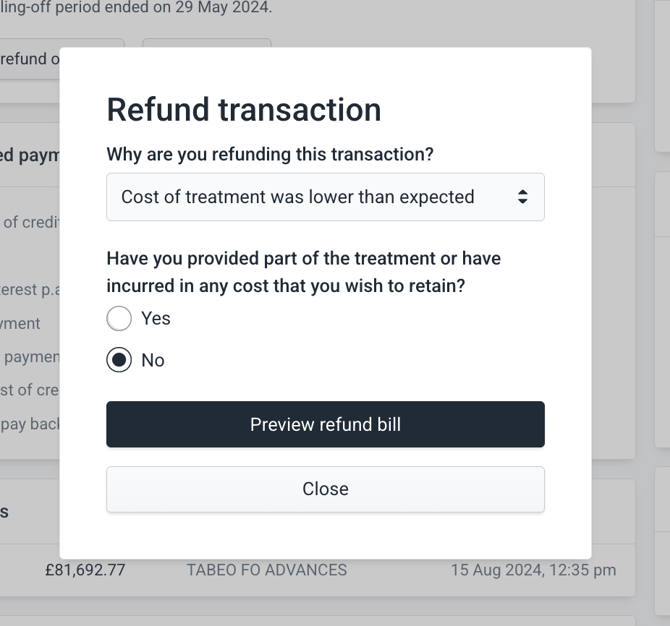
“Have you provided part of the treatment or incurred any cost that you wish to retain?”
For a full refund:
- Select No
- Click Preview refund bill
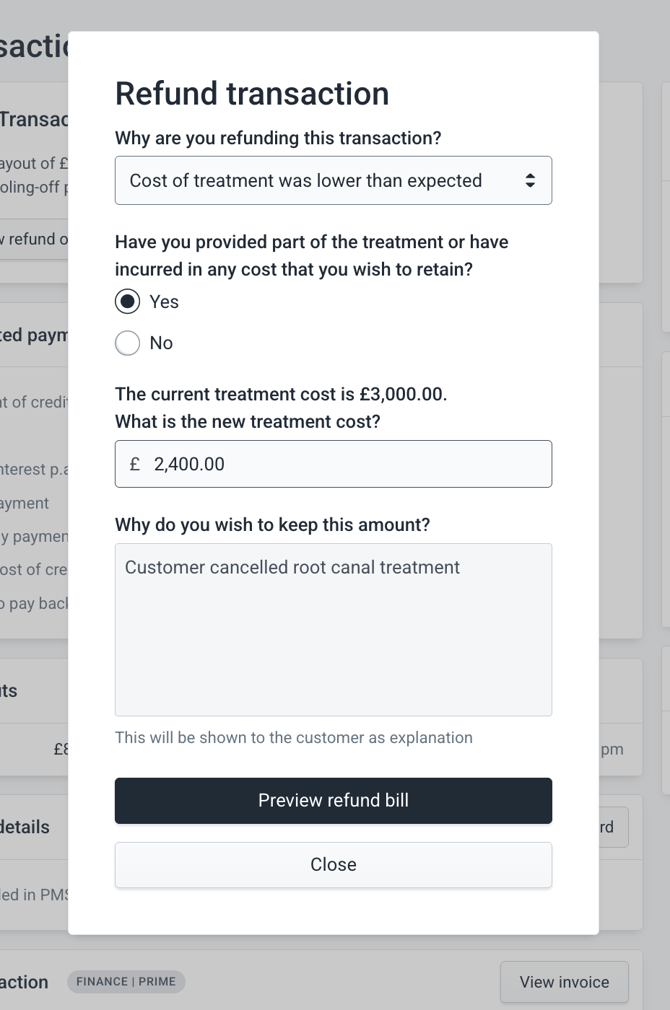
For a partial refund:
- Select Yes
- Enter:
- The final treatment cost (the amount you are keeping)
- The reason for the change
- Click Preview refund bill
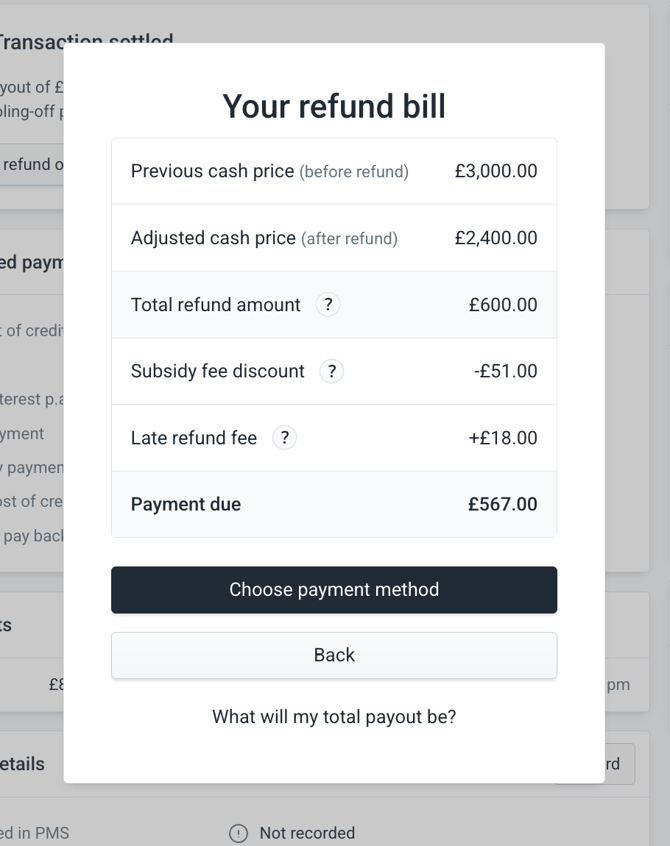
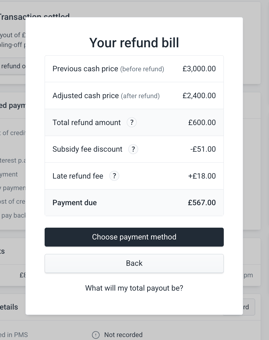
Step 4: Check the refund bill
You’ll see a summary including:
- Total refund amount
- Any fees
- Final amount to pay
Check everything carefully before continuing.
A few things to note:
- The subsidy fee appears as a negative amount - this means you’re not charged it
- If the refund is after the 14 day cooling-off period, a late fee may apply
Step 5: Complete the payment
- Click Choose payment method
- Enter your practice card details
- Click Pay Now
We accept debit or credit cards from:
- Visa
- Mastercard
We do not accept:
- Amex
- Diners Club
What happens next
- The patient is notified immediately by email
- If the patient has overpaid, the difference is refunded to their bank account
- If the patient has underpaid, their loan is adjusted accordingly
Important notes
- Do not use the patient’s card. Refunds must always be processed using your practice card
- For partial refunds, you must enter the final treatment cost (what you are keeping), not the refund amount.
Example:
- Original treatment: £1,500
- Final treatment: £1,000
- You enter: £1,000
Method 2: Refund via Bank Transfer (BACS)
Use this method if you are unable to process the refund via card.
Step 1: Check the exact refund amount
Before making a transfer:
-
Log in to Tabeo
-
Open the transaction
-
Follow the refund flow to view the refund bill / amount to be paid
Important
Always use the exact amount shown in the app. Sending a different amount will delay the refund.
Step 2: Make the bank transfer
Use the details below:
- Account Name: Tabeo Finance Ltd
- Bank: HSBC
- Account Number: 41319787
- Sort Code: 40-11-60
- Transaction reference: [ENTER TRANSACTION ID]
Missing or incorrect references will cause delays, as we won’t be able to match the payment.
Fees and timing
- If the refund is processed within 14 days of the loan going live:
- You will receive the full fee back on the refunded amount
- If the refund is processed after 14 days:
- You will still receive the fee back on the refunded amount
- A late refund fee may be charged per our Merchant Terms & Conditions. If you are charged, you will see this on your refund bill.
What patients may ask about refunds
In most cases, the patient will receive the full refund amount with no additional charges.
However, if the loan included interest:
- The patient will not be charged a fee for the refund itself
- But they may still have paid some interest on the loan, depending on how long it was active
- This interest is not refundable, as outlined in their loan agreement
If a patient has questions about this, they can contact Tabeo support directly.